Is your Android phone running slower than usual? Apps taking longer to open, lag while scrolling, or slow performance during gaming can be frustrating. Over time, Android devices can slow down due to background apps, storage issues, outdated software, and more.
The good news is that you don’t always need a new phone to fix these problems. With a few simple adjustments, you can significantly improve your device’s speed and performance. Here are 10 easy tips to make your Android phone faster.
1. Restart Your Phone Regularly
Restarting your phone is one of the simplest ways to improve performance. It clears temporary files, stops background processes, and refreshes the system. If your phone feels slow, a quick restart can often solve the issue.
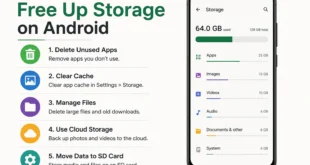
2. Clear App Cache
Apps store temporary data called cache to load faster. However, over time this cache can grow and slow down your phone.
To clear cache:
- Go to Settings
- Tap Apps
- Select an app
- Tap Storage
- Choose Clear Cache
Clearing cache frees up space and improves app performance.
3. Remove Unused Apps
Many users install apps they rarely use. These apps take up storage and may run background processes.
Steps:
- Open Settings
- Go to Apps
- Uninstall apps you don’t use
Removing unnecessary apps helps your phone run more smoothly.
4. Free Up Storage Space
Low storage is a common reason for slow phones. When your storage is almost full, your device struggles to manage files efficiently.
You can free up space by:
- Deleting old photos and videos
- Removing large files
- Clearing downloads
- Using cloud storage
Try to keep at least 20–25% of storage free for better performance.
5. Disable Animations
Android animations look nice but can slow down older devices.
To disable them:
- Enable Developer Options
- Go to Settings > Developer Options
- Reduce Window animation scale, Transition animation scale, and Animator duration scale
Setting them to 0.5x or Off can make your phone feel much faster.
6. Update Your Software
Software updates often include performance improvements, security patches, and bug fixes.
Check for updates:
- Open Settings
- Tap System
- Select Software Update
Keeping your Android version updated helps maintain optimal performance.
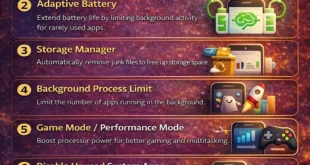
7. Limit Background Apps
Some apps continue running even when you are not using them, consuming RAM and battery.
You can:
- Close apps from the recent apps menu
- Restrict background activity in settings
This helps reduce system load and improves speed.
8. Use Lite Versions of Apps
Many popular apps offer Lite versions designed for better performance on slower devices.
Examples include:
- Facebook Lite
- Messenger Lite
- YouTube Go
These apps use less storage, RAM, and data.
9. Disable Auto-Sync for Unnecessary Apps
Auto-sync keeps your data updated but can slow down your device if many apps are syncing simultaneously.
Steps:
- Go to Settings
- Tap Accounts
- Disable sync for apps you don’t need
This reduces background activity and improves performance.
10. Reset Your Phone (Last Option)
If your phone is still slow after trying everything, a factory reset might help. This removes all files, apps, and settings, giving your phone a fresh start.
Before resetting:
- Backup important data
- Save photos and contacts
Then go to:
Settings > System > Reset > Factory Data Reset
This often restores your phone’s original speed.
Final Thoughts
A slow Android phone doesn’t always mean it’s time to upgrade. By clearing storage, managing apps, disabling animations, and keeping your system updated, you can dramatically improve performance.
Try these 10 simple tips, and your Android device should feel faster, smoother, and more responsive.